
Two Pitfalls of Safari Cloud Signing in GitHub Actions
Background
In Automating Safari Extension Publishing with GitHub Actions, I described a pipeline that builds, signs, and uploads Safari extensions from a macOS runner using Xcode’s cloud signing (-allowProvisioningUpdates). It works, but getting there involved two failures that were painful to debug for the same reason: the error messages are vague, and searching for them returns almost nothing. This post documents both.
If you only remember one thing: an ephemeral CI runner changes the assumptions Apple’s signing tools were designed around. Both pitfalls come from that mismatch.
Pitfall 1: “Maximum number of certificates”
The setup: a macos-* GitHub-hosted runner, cloud signing enabled with -allowProvisioningUpdates. Everything works. Releases go out. Then one day, with no changes on your side, the build fails with an error about having reached the maximum number of certificates.
What actually happened: every GitHub-hosted runner starts with an empty keychain. When cloud signing finds no usable signing identity, it doesn’t fail — it helpfully creates a brand-new Apple Distribution certificate for your account and puts the private key in the runner’s keychain. Then the job ends and the runner is destroyed, taking the private key with it. The certificate itself stays registered in your Apple Developer account, permanently unusable because its private key no longer exists anywhere.
So every release silently burns one certificate. Apple caps the number of distribution certificates per account, and once you hit the cap, cloud signing can no longer create a new one and the build fails. The insidious part is that every run before the cap succeeds — nothing looks wrong until it suddenly and permanently does.
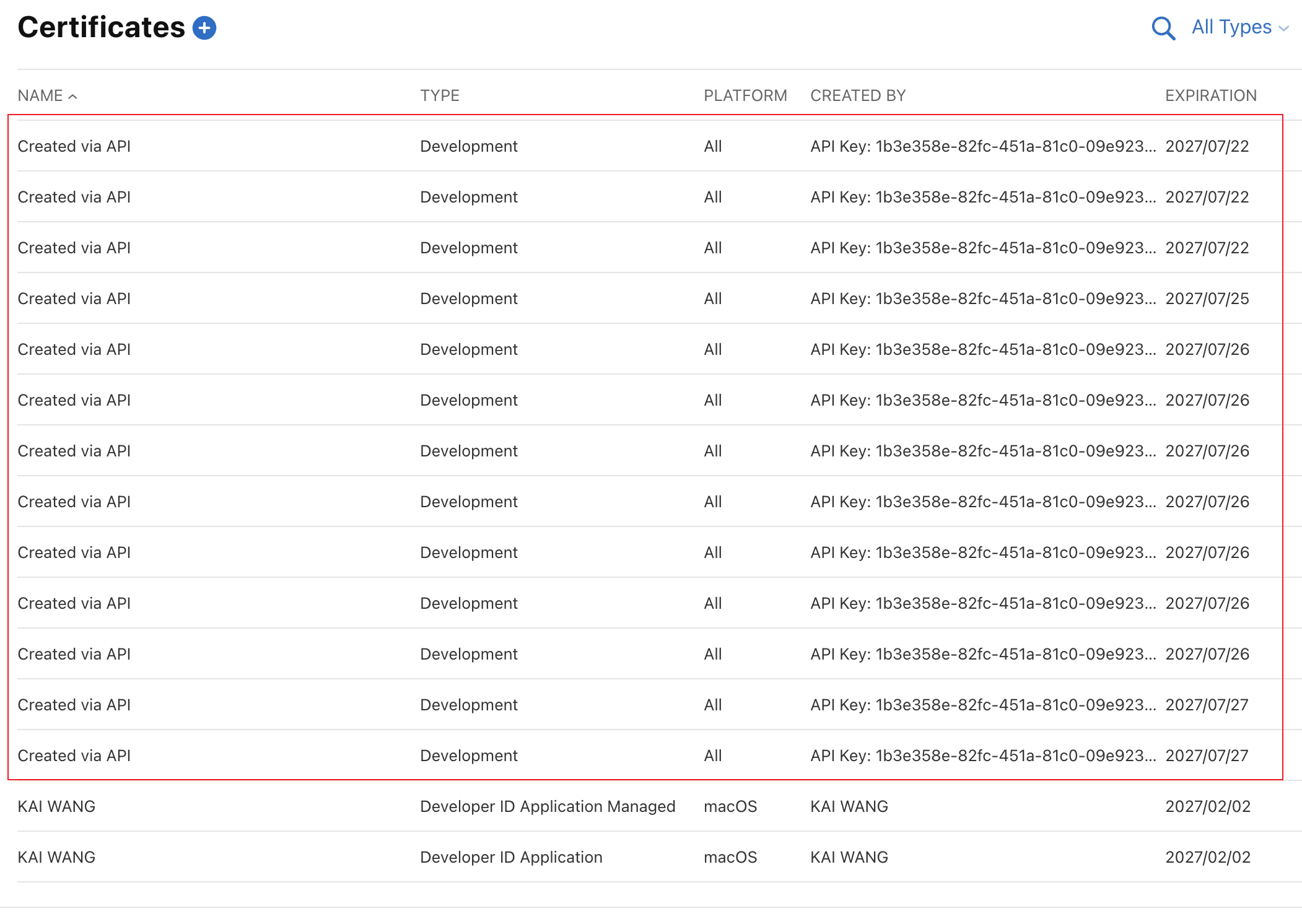
This is what that looks like once it’s had time to pile up — over a dozen certificates, all “Created via API”, all within about a week. Every one of them is orphaned: its private key died with the runner that created it.
The fix is to stop letting CI mint certificates:
- Create one Apple Distribution certificate yourself (Xcode → Settings → Accounts → Manage Certificates, or the developer portal)
- Export it as a
.p12with a password - Store both as repository secrets (
base64the.p12) - Import it into a keychain at the start of the CI job, before
xcodebuildruns
- name: Import signing certificate
  run: |
    echo "$APPLE_CERTIFICATE_BASE64" | base64 --decode > certificate.p12
    security create-keychain -p actions build.keychain
    security default-keychain -s build.keychain
    security unlock-keychain -p actions build.keychain
    security import certificate.p12 -k build.keychain \
      -P "$APPLE_CERTIFICATE_PASSWORD" -T /usr/bin/codesign
    security set-key-partition-list -S apple-tool:,apple: -s -k actions build.keychain
  env:
    APPLE_CERTIFICATE_BASE64: ${{ secrets.APPLE_CERTIFICATE_BASE64 }}
    APPLE_CERTIFICATE_PASSWORD: ${{ secrets.APPLE_CERTIFICATE_PASSWORD }}
With a valid identity already in the keychain, cloud signing reuses it across every run instead of creating new ones.
Note: after fixing this, go to the certificates list in the developer portal and revoke the pile of orphaned certificates your CI runs left behind. They’re the ones you don’t have a private key for.
Pitfall 2: “Cloud signing permission error”
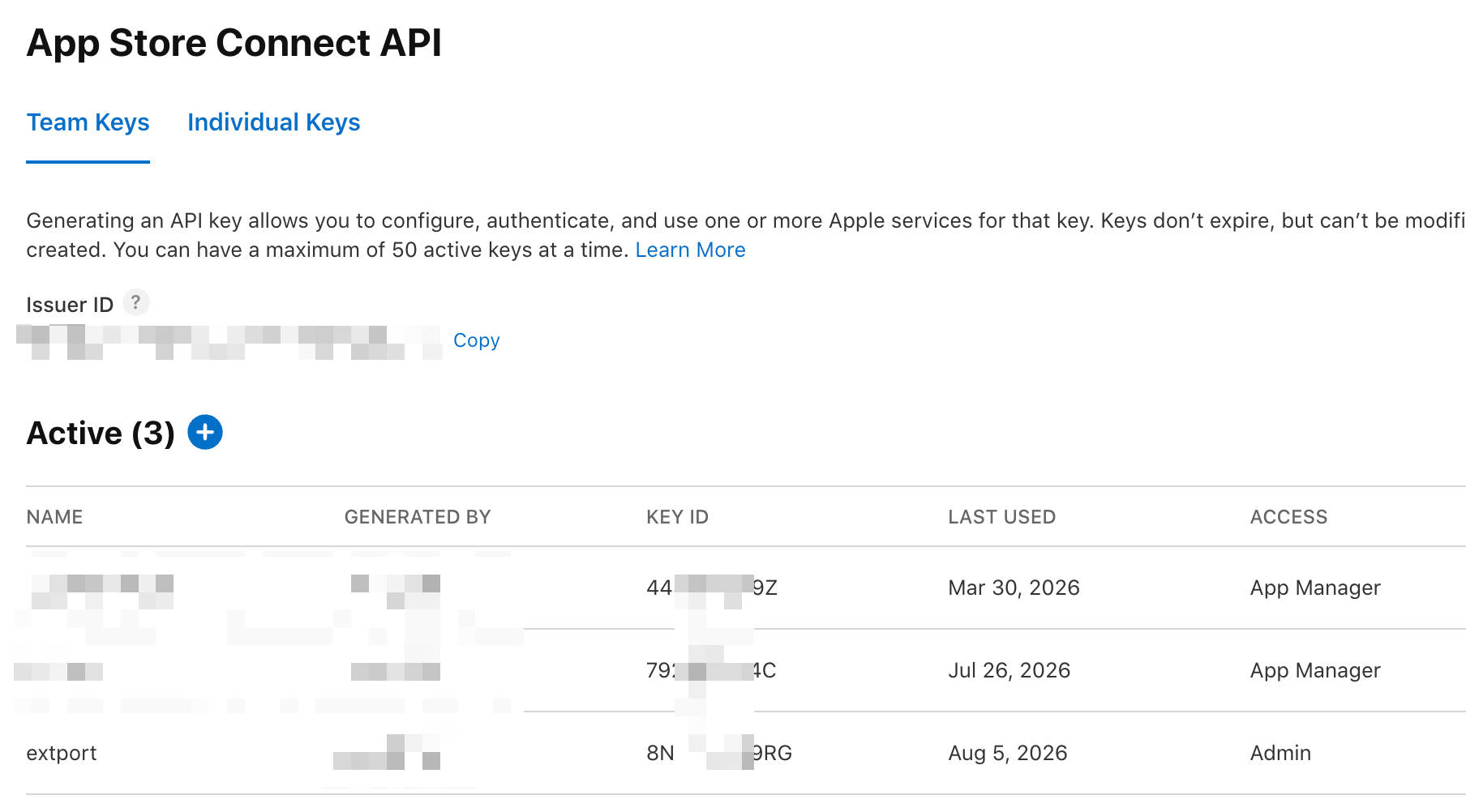
The App Store Connect API key you pass to xcodebuild has a role, chosen when the key is created. Here’s the trap: a key with the Developer or App Manager role authenticates successfully — and then the build fails halfway through signing with nothing more than “Cloud signing permission error”.
That failure mode is what makes it confusing. The key isn’t rejected. Uploads and other App Store Connect API operations work with lower roles. Only the cloud signing step dies, with an error that doesn’t mention roles at all.
In my testing, cloud signing requires a key with the Admin role. Since a key’s role is fixed at creation, the fix is to generate a new key: App Store Connect → Users and Access → Integrations → App Store Connect API → generate a key with the Admin role, and download the .p8 (you only get one chance to download it).
Note: treat an Admin-role
.p8as the crown jewels it is — it’s the one real secret in this whole pipeline. Identifiers like the issuer id, key id, and team id are not secrets; the.p8and the.p12are.
Wrapping Up
Both pitfalls trace back to the same root: Apple’s signing tooling assumes a long-lived development machine, and an ephemeral runner violates that assumption in ways that fail late and vaguely rather than early and clearly.
Since writing the previous post, I’ve folded this whole pipeline — Xcode project generation, signing with the fixes above, upload, and review submission — into extport, the publishing tool I now use for all of my extensions. If you’d rather not maintain the yaml yourself, that’s the packaged version of everything this post and the previous one describe.